
Have you ever felt trapped in the cycle of a denied insurance claim? You are not alone; many practitioners have faced challenges in securing fair compensation for their services over the years. Often, this stems from a lack of clear guidance on how to properly fill out and submit claims. The CMS-1500 form, whose completion instructions were approved by the National Uniform Claim Committee (NUCC) in November 2005 and are updated annually, is designed to help address these issues.
This form is crucial for ensuring that healthcare providers receive appropriate compensation for their efforts. While it is regarded as one of the most effective paper claims available, filling it out accurately requires careful attention and a thorough understanding of its components. Including additional claim information on the CMS-1500 form is essential to ensure proper processing and payment.
This blog aims to provide a comprehensive overview of the CMS-1500 form and the best practices for completing it correctly. Let’s take a closer look at each section of this essential claim form to maximize its potential benefits.
Why Claim Forms Matter
Claim forms are a vital part of the healthcare system, a way for healthcare providers to communicate with insurance companies and get paid for medical services rendered. The most common claim form is the CMS-1500 form which is used by healthcare providers to bill Medicare and other government insurance for outpatient services. Completing claim forms accurately is key to smooth claims processing, timely payments and recognition of healthcare providers.
What is the CMS 1500 Form?
The CMS-1500 form (current version 02/12, in use since 2014), also known as the HCFA 1500 claim form, is a professional document used for submitting health insurance claims.
The CMS-1500 form is a standard claim form used by healthcare providers to bill Medicare and other government insurance plans for outpatient services. It’s used to submit claims for medical, surgical, and diagnostic services, such as doctor visits, physical therapy sessions, and diagnostic tests that depend on accurate laboratory billing services.
Including the authorized person’s signature, along with the patient’s signature, is essential to ensure the claim is complete and processed effectively.
This form is primarily used by non-institutional healthcare providers, such as doctors, therapists, and chiropractors. It is also the standard professional claim form for commercial insurers, so virtually all payers accept the CMS-1500 for non-institutional claims.
The History of the CMS-1500 Form
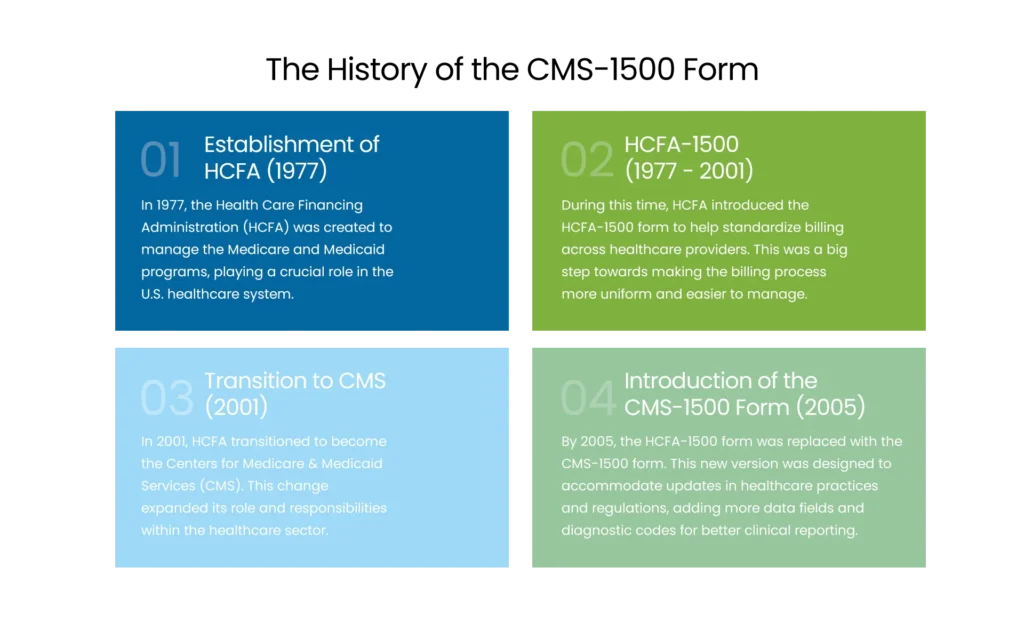
- Establishment of HCFA (1977)
In 1977, the Health Care Financing Administration (HCFA) was created to manage the Medicare and Medicaid programs, playing a crucial role in the U.S. healthcare system. - HCFA-1500 (1977 – 2001)
During this era, HCFA standardized professional billing on what became known as the HCFA-1500 form. This was a big step towards making the billing process more uniform and easier to manage.
- Transition to CMS (2001)
In 2001, HCFA transitioned to become the Centers for Medicare & Medicaid Services (CMS). This change expanded its role and responsibilities within the healthcare sector.
- Introduction of the CMS-1500 Form (2005)
By 2005, the HCFA-1500 form was replaced with the CMS-1500 form. This new version was designed to accommodate updates in healthcare practices and regulations, adding more data fields and diagnostic codes for better clinical reporting. - Version 02/12 (2014)
The current form version added the ICD indicator, expanded diagnosis lines from 4 to 12 (A–L), and retitled several fields. This is the version in use today.
NPI Coding Problems? We’ve Got You
Finding it tricky to fill NPI fields on CMS‑1500? Trust our team for accurate, expert billing support.
Overview of CMS-1500 Form Sections
The CMS-1500 form consists of 33 fields that together provide a detailed summary of the patient, the services rendered, and the billing information. Filling it out accurately is essential for smooth insurance claim submissions and processing, ensuring that healthcare providers get expert billing support from their RCM partners.
- 1-13: These sections gather patient and insured information, patient’s name, address, birth date, sex, insurance info and is the condition work related, auto accident or other type of accident. Also include the insured’s birth date for accurate claim processing.
- 14: This section is for the date of current illness, injury or pregnancy. Make sure to report current services and any hospitalization dates related to the patient’s condition.
- 15-17: These sections capture additional dates related to the patient’s condition and treatment, prior illnesses or hospitalizations. Make sure to enter the applicable qualifier and qualifier for these dates for accurate claim processing.
- 18-23: Here’s where you collect information about the referring provider, extra claim details, external lab data and diagnoses. Make sure to check if the patient’s condition is related to another accident to determine the correct insurance coverage.
- 24-30: These sections detail the services provided, service date, location, procedures performed, charges and number of days or units billed. Make sure to check the box for each field, document the medical service provided and include the original reference number for resubmitted claims. Also detail the patient’s relationship to the insured, any payment received, prior authorization number and the provider agrees to the terms of the payer’s program.
- 31-33: These final sections are for the provider’s information and claim certification, provider’s name, address, NPI number and signature. Make sure to include the rendering provider’s name, rendering provider’s NPI, service facility location NPI and any unique identifier required for accurate claims processing.
How to Fill out a CMS 1500 Form
Filling out CMS-1500 forms correctly is essential for ensuring that claims are processed and paid quickly. Here are some key guidelines to fill out this form:
- Always use black ink and print clearly within the designated boxes to facilitate reading by Optical Character Recognition (OCR) technology.
- Avoid using punctuation or special characters.
- Use the correct codes for the place of service, type of service, and diagnosis.
- Complete all required fields, including the provider’s NPI number, the billing provider NPI, and the patient’s insurance policy number.
- Verify that the total charge is accurate and corresponds to the sum of the line item charges.
Refer to the NUCC for additional guidance on this matter.
Note:
“Payers only accept original forms printed in Flint OCR Red ink, photocopies and home-printed versions are rejected. OCR scanners are calibrated to drop out the red form lines and read only the data, and a copied form’s lines aren’t invisible to the scanner.”
Here’s how to fill out the CMS-1500 form:
| 1 | Required | Box 1 on the CMS-1500 form is used to specify the type of health insurance coverage associated with the claim. Select the appropriate box for the coverage type (e.g., Medicare). Seven different plan types are available, but only one can be chosen. |
| 1a | Required | Provide the patient’s Medicare beneficiary identifier, indicating whether Medicare is the primary or secondary payer. |
| 2 | Required | Enter the patient’s name as it appears on their ID card. For newborn claims using the mother’s ID, input the infant’s name. This is valid only during the birth month and the following month. In Box 19, note “Newborn using Mother’s ID” or specify “(twin a)” / “(twin b).” |
| 3 | Required | Record the member’s date of birth and mark the gender box (male or female). |
| 4 | If Applicable | Only required when billing for an infant using the mother’s ID. |
| 5 | Required | Provide the member’s complete address and telephone number. |
| 6 | If Applicable | Patient’s Relationship to Insured – Check Self, Spouse, Child, or Other as applicable. |
| 7 | Not Required | Fill in the address for the insured individual. |
| 8 | Not Required | Patient Status. |
| 9a-d | Not Required | Include details such as other insured’s name, group/policy number, employer or school, and plan/program name. |
| 10a-c | Required | Patient’s Condition Relation. |
| 10d | Not Required | Reserved for Local Use. |
| 11a-b | Required | Include insured’s name, group/policy number, employer/school, and plan/program name. |
| 11c | If Applicable | Enter the insurance plan or program name; some claim types, like Medicare/Medicaid crossovers, have payer-specific requirements. |
| 11d | If Applicable | Indicate whether another health plan exists by checking “Yes” or “No.” |
| 12 | Required | Signature and Date, ‘Signature on File’ is acceptable. |
| 13 | Required | Insured’s or Authorized Person’s Signature, ‘Signature on File’ is acceptable. |
| 14 | Required | Enter the first symptom date, accident date, or last menstrual period (LMP). |
| 15 | Not Required | If the patient had the same or similar condition before, provide the initial occurrence date. |
| 16 | Not Required | Include dates when the patient could not work in their current job. |
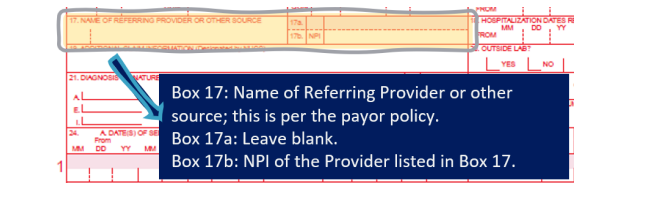
| 17 | If Applicable | Provide referring provider’s name. This person may request consultations, tests, therapy, medications, or equipment. |
| 17a | If Applicable | Other ID of referring provider (legacy field) – Generally left blank unless a payer requires a non-NPI ID with qualifier. |
| 17b | If Applicable | NPI – Enter Referring Provider’s NPI number. |
| 18 | If Applicable | For hospital stays, enter admission and discharge dates. Leave discharge blank if still hospitalized. |
| 19 | If Applicable | Used for extra information, procedure justifications, or emergency certifications. Include modifiers, anesthesia times, supplies, or “By Report” codes if space allows. |
| 20 | If Applicable | Outside Lab? – Select “yes” if the diagnostic test was conducted by another provider or licensed lab. Mark “X” if applicable. |
| 21 | Required | Diagnosis or Nature of Illness/Injury – Enter the ICD indicator (‘0’ for ICD-10-CM), then up to 12 ICD-10-CM codes on lines A–L. The primary diagnosis goes on line A. |
| 22 | Not Required | Medicaid Resubmission Code. |
| 23 | If Applicable | Provide the prior authorization or referral number. |
| 24A–24G | Required | Dates of service, place of service code, EMG indicator, CPT/HCPCS code with modifiers, diagnosis pointer (letter A–L, not the code), charges, and days/units. |
| 24H | If Applicable | EPSDT/Family Planning indicator. |
| 24I | If Applicable | ID qualifier when a non-NPI ID appears in shaded 24J (e.g., ZZ for taxonomy where required). |
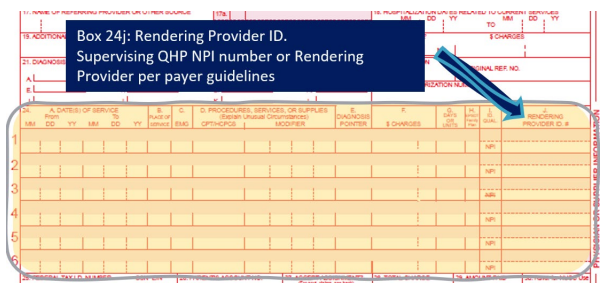
| 24J | Required | Rendering provider’s Type 1 (individual) NPI in the unshaded portion; legacy non-NPI ID in the shaded portion only if the payer requires it. |
| 25 | Required | Billing provider’s Federal Tax ID (EIN or SSN) with the matching checkbox. |
| 26 | Optional | Patient account number, recommended, as payers return it on the remittance. |
| 27 | Required | Accept assignment: check Yes or No. |
| 28–29 | Required / If Applicable | Total charge; amount paid. |
| 30 | Not Used | Reserved for NUCC use on the 02/12 form. |
| 31 | Required | Physician/supplier signature and date. |
| 32 / 32a | If Applicable | Service facility name and address; facility NPI in 32a when services were rendered somewhere other than the billing address. |
| 33 / 33a / 33b | Required | Billing provider name, address, and phone; billing NPI in 33a (Type 2 for groups, Type 1 for unincorporated solo providers); 33b only for a payer-required non-NPI ID with qualifier. |
How to Enter an Individual or Group Provider Identifier?
Occasionally, a payer may ask for an additional identifier on the claim in addition to the billing/rendering NPI. Before entering it, verify the rendering provider’s details, name and National Provider Identifier (NPI), against the payer’s records to ensure accurate claims processing and reimbursement.
Referring Provider Information
Provide the name of the referring or ordering physician if a physician was involved in the order or referral of the service or item. It is mandatory for all physicians who order services or refer Medicare beneficiaries to include this information. If Medicare policy requires reporting a supervising physician, please include that in item 17. For claims that involve multiple referring, ordering, or supervising physicians, submit a separate CMS-1500 claim form for each one. Ensure that the provider’s information, including the name and NPI number, is accurately displayed in Box 24J to identify the medical service provider.
You should include one of the following qualifiers to specify the role of the physician (or non-physician practitioner):
| Qualifier | Provider Role |
| DN | Referring Provider |
| DK | Ordering Provider |
| DQ | Supervising Provider |
Place the qualifier to the left of the dotted vertical line in item 17. Box 17a is optional and can be left blank. In Box 17b, provide the NPI of the referring, ordering, or supervising physician or non-physician practitioner. It is necessary for all physicians and non-physician practitioners who order services or refer Medicare beneficiaries to include this information.
Rendering Provider Information
Rendering providers are responsible for delivering face-to-face services to members. In some cases, non-face-to-face services may also be reimbursed. If a payer requires the NPI number of the individual rendering provider on claims, this should be entered in Box 24J. It is crucial to accurately capture the rendering provider’s NPI in Box 24J to ensure precise identification for claims processing and reimbursement accuracy.
The supervising provider oversees the rendering providers and may also provide specific services within their scope of practice. When payer policies dictate that billing should occur under the supervision of a qualified healthcare professional (QHP), their NPI number should be included in Box 24J for all services. Only one rendering NPI should appear per claim, the rendering NPI (24J), billing NPI (33a), and any facility (32a) or referring (17b) NPI coexist on the same claim without conflict.
Here’s how to input information that will be displayed in each of these sections on the claim, according to the payer.
- Individual Providers
Your Type 1 NPI number should be entered in the unshaded portion of Box 24J on the claim form. Additionally, make sure to include your NPI number in Box 33a.
- Group Providers
All claim submissions must include both the Type 1 (individual) and Type 2 (organization) NPI information. The Type 1 NPI identifies the rendering provider, while the Type 2 NPI identifies the organization, corporation, group practice, or facility. Note that incorporated solo providers still bill this way, Type 2 in 33a, Type 1 in 24J; only unincorporated solo providers use their Type 1 NPI in both boxes.
Understanding the Rendering Provider
The rendering provider is the healthcare professional who sees the patient and performs the treatment, exam or procedure. This is who the patient sees and is responsible for the services provided. The rendering provider’s information is critical to identifying the correct healthcare professional for the services provided. On claim forms, the rendering provider’s information goes in Box 24J which requires the NPI number. The rendering provider is key to making sure the information on the claim form is accurate and complete so the services can be reimbursed.
National Provider Identifier (NPI)
The National Provider Identifier (NPI) is a 10 digit number assigned to healthcare providers for identification purposes. It replaced all the old identification numbers and is critical to identifying healthcare providers and their roles in the healthcare system. The NPI is a universal identifier for healthcare providers in electronic transactions and communication so healthcare providers can be properly recognized and their services recognized. On claim forms the NPI is used to identify the rendering provider, billing provider and service facility location and other entities.
Box 24J: Rendering Provider ID
Box 24J on the CMS-1500 claim form is where you put the rendering provider’s ID which is usually the NPI. Completing Box 24J correctly is crucial so the rendering provider is correctly identified and linked to the services rendered. The NPI in Box 24J helps insurance companies verify the provider’s credentials and expertise so claims can be processed and paid accurately. If an other ID Qualifier is provided, the rendering provider’s information may populate into Box 24I and Box 24J.
How to Submit Your CMS-1500 Form
After completing your form, you can submit it either by mail or electronically to the designated clearinghouse or billing software, depending on the payer’s requirements. Ensure that all financial transactions, including ‘payment received’ from other payers or patients, are accurately documented on the CMS-1500 form. Make sure to pay attention to deadlines, and be prepared to follow up or provide any additional information if requested.
Benefits of Accurate Completion
Completing Box 24J and other sections of the claim form has many benefits:
- Smooth claims processing and timely payments
- Recognition of healthcare providers for their work and services
- Fewer errors and rejections in claims processing
- Better communication between healthcare providers and insurance companies
- Better patient care and satisfaction through faster reimbursement
By having accurate information on claim forms, providers can streamline their reimbursement process, reduce administrative work and focus on patient care.
Wrap Up!
The CMS-1500 form plays a vital role in today’s healthcare system. Accurate and timely completion of these forms can enhance your administrative processes and facilitate quicker reimbursements.
As a healthcare professional with a busy schedule, simplifying your paperwork can significantly reduce the time spent managing your practice. Instead of handling this complex process alone, consider partnering with a trusted medical billing company like MedCare MSO. We provide medical billing services that adhere to the latest industry standards. Contact us today to discover how we can support the growth of your practice.